IOLTA ABCs

OK, strictly speaking, you don’t need to have a trust account. If you never receive settlements on behalf of clients, never receive advance fee or cost payments from clients, and never hold other funds on behalf of clients – you might not (at least in MN) need a trust account. However, the Lawyers Professional Responsibility Board’s recommended practice is to maintain a trust account just in case. Think of it as cheap CYA insurance.

Opening an IOLTA (lawyer’s trust account) in Minnesota is a simple process – find an approved bank, download and complete a Notice to Financial Institution form (see the Lawyer Trust Account Board), and then take the form with you to the bank when you open the account. After spending 30 minutes with a banker and making a nominal deposit you’ll walk away with an IOLTA account.

While the Lawyers Board and the Minnesota Bar Association have a number of helpful materials on managing your trust account, they do omit some very practical hints like:

  • Use different color checks for your operating and trust accounts (green for your operating account – its your money & red for your trust account – stop its your client’s money)
  • Color code your deposit slips so that they match the check color of the account (green stripe for operating, red stripe for trust)
  • Keep your trust account & operating account at different banks
  • When choosing a bank for your trust account, ask what interest rate the bank pays on the funds – pick a bank that offers the best interest rate. It costs you nothing while helping others.
The eFax Option

How does one handle the occasional fax? The traditional model is to buy a standalone fax machine or a multi-function printer and either pay for a dedicated phone line or a line sharing device. The other option is eFax.

eFax services convert a fax into a digital file that can be received by eMail and vice versa. The typical eFax solution provides a dedicated fax phone number that will convert incoming faxes to email attachments that are automatically sent to your eMail address. Your outgoing faxes are sent as eMail attachments to the eFax service which sends them to physical fax numbers so your outgoing faxes are received just as if they had been sent by a standard fax machine.

Based on research done by FaxCompare, the “market standard” is for a service to provide a 30-day free trial, have no start up fee or hidden fees, and to offer 24/7 customer service and both send/receive capabilities. Expect to pay about $10 per month for 300 total pages (incoming & outgoing combined) with additional pages costing about $0.10 per page.

Here is a “SaaS” model that works for me. It is less expensive than owning dedicated hardware, is more efficient since it cuts down the number of steps needed to send a fax, should be more reliable, and is more secure (faxes go to specific eMail addresses rather than sit in the fax machine until someone picks them up). Plus it is the “greener” alternative. The best part is that FaxCompare has done most of the comparison shopping already and offers a set of apples-to-apples vendor reviews.

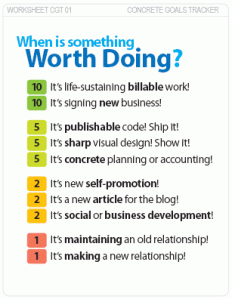
When is it Worth Doing?

Printable CEO

Image from The Printable CEO (c)David Seah

Wouldn’t it be great if you had your own personal CEO? Someone to make sure you are always working on the important things. Well, for those of us who can’t afford to hire Warren Buffet, the Printable CEO is a much cheaper alternative. While it may take a little customization for your particulars, it is a simple direct way to focus on goals that move your company forward. The Printable CEO Series offers forms for calendars, goal and task tracking, and task ordering. There is even a web-based version for those that need something more high-tech & greener than paper.

SaaSy Practice Management

Carilyn Elefant’s Complete v. Cobble v. Cutting Edge is an excellent 30,000′ look at the general choices available for practice management. While  I believe that she is right in recommending that any new solo take a serious look at web-based (SaaS) solutions, I don’t believe that desktop solutions have seen their day. Until reliable high-speed Internet connections are ubiquitous the web will be both a great strength and an Achilles heel.

As I look for a practice management solution, I am looking for that magic bullet – a software package that will facilitate the mundane business of practicing law leaving me more time to practice law. Sure a cobbled system – Outlook for contact management, a strict file structure & naming conventions or perhaps some type of revision control software (SVN is free) for document management, and a tickler/productivity system like Tim Ferriss never forget anything againis an inexpensive and workable solution. The downside is that like any D.I.Y. project, it just invites tinkering, tweaking, and time-wasting as one strives to perfect it, and, unlike desktop and SaaS solutions, there is nothing in the cobbled solution (besides one’s personal iron determination) to impose disciplined consistency.
Desktop solutions are the devil we know. They have years of development behind them leading to full-featured software and generations of lawyers that will swear by/at them. The implementation of any desktop solution represents a serious investment of money (upfront license costs, yearly maintenance agreements) and time in the form of steep learning curves and software maintenance.

The new kids on the block are SaaS solutions. Lacking the comprehensive feature set of the desktop solutions, they reduce training costs and eliminate maintenance expenses. If one considers total cost of ownership, SaaS solutions can be a quarter of the cost of a desktop solution. The risk here is one of trust. Do you trust your Internet connection enough to risk access to your conflict checker/time keeper/billing/document management software? Do you trust the SaaS vendor to keep your data secure, private, and confidential? Lacking a well-established user community and reputations built through long experience, SaaS solutions are the devil you don’t know.

See also:

Online Backup Services

If the first rule of the digital age is “save early, save often” the second has to be “backup your data daily” and unless you are an ubergeek with a home-brew 18 server complex with Raid 5 disk arrays capable of doing disk to disk mirroring build into your hall closet, online backup services like BackBlaze, Carbonite, iBackup, SugarSync, or Iron Mountain may be a solution to a problem you hope you never have.

However, not any on-line backup solution will do for the paperless law office (or for that matter, a law office that maintains any electronic client information). After all there is an ethical duty to protect client data and maintain client confidentiality. So before running out and signing up for the cheapest on-line service out there be sure that the service provides an automatic, encrypted backup service that gives you exclusive access to your files (or at least a written statement that files are kept confidential). Then, periodically check your backups by doing a file restore – remember doveryai, no proveryai (trust but verify)

For more information, see: