Metrics That Matter: Data Loss

It is estimated that data loss costs U.S. businesses average $12-418 billion per year and, on average, each hour of downtime costs $50,000. The average cost to re-enter 20 megabytes of data is between $17,000 and $19,000 and takes between 19 and 21 days[i]. The cost to recreate data from scratch is estimated to be between $2000 and $8000 per megabyte[ii]. A data loss event can be catastrophic occurrence; 60% of companies that lose their data close within 6 months of the event and 72% fail within 24 months[iii].

The leading causes of data loss are: hardware or system malfunctions (40-44%), human error (29-32%), software corruption (13-14%), computer viruses (6-7%), theft or data breach (9%), hardware destruction or natural disasters (3%)[iv]. The leading causes of data theft are: attacks from external sources (73%), theft by business partners (39%), and attacks from internal sources (18%)[v]. It estimated that: 1 in 5 computers will suffer a fatal hard drive crash within its lifespan, 15% of laptops are stolen or lost (approximately 2000 per day), and, on average, a hard drive fails every 15 seconds[vi]. Continue reading
Solo Practice University: Mentorship For The Rural Lawyer

The harsh reality is that law school only teaches theory and, until recently, learning the actual practice of law was taught by that harsh task-master experience. For the new associate just entering an established law firm, experience’s lessons are tempered by the older and wiser partners, however for those of us who march to our own drumbeat as solo practitioners finding mentors can be a daunting task. On March 20th, 2009, this changes with the opening of Solo Practice University.

Solo Practice University is the brain child of Susan Cartier Liebel and stems from her frustration with the inability of law schools to cover the innumerable variables that are unique to the actual solo practice of law. Solo Practice University is an on-line community bringing law students and solo practitioners together with an  experienced, nationally recognized faculty. Continue reading

LPM Tools: Metrics That Matter

In Comparing the Cost of SaaS LPM Tools to Conventional: The Metrics That Matter Carolyn Elefant presents a well considered argument that simply comparing the cost of software as a service practice management (SaaS LPM) tools to conventional desktop ones (as I do in: RocketMatter & Clio) isn’t accurate as it does not incorporate the intangible benefits inherent in the SaaS model such as the reduction in IT support costs, office space requirements, hours lost responding to client requests for updates, etc. I do have to agree with her assessment that one should make this type of externalities-based comparison when choosing a LPM system. However, I believe that for all its positives, the SaaS model has some serious flaws to overcome.

Current SaaS LPM offerings are immature technology that require reliable a high-speed Internet connection and offer no off-line capabilities. Whereas desktop systems tend to be mature software offerings from stable companies with long track records and most desktop systems offer some form of mobile access. Buying into one of the current SaaS solutions means risking mission-critical software on the belief that you will have Internet access 24/7/365 and that nothing will fail in the electronic chain that connects your computer to the SaaS provider’s servers. Continue reading

The Cost of Legal Services

If you have a concern about the cost of legal services, then LawHelp.org and LawHelpMN.org may be the resources you are looking for.

Both organizations are gateways that help low and moderate income people find referrals to legal aid and public interest law offices, and both provide basic information about legal rights, self-help information, court information and links to social service agencies. While LawHelpMN.org is specific to Minnesota, LawHelp.org acts as a nationwide clearing house.

So don’t avoid seeking out legal help just because you believe you can’t afford it. Good, affordable legal help is out there and these sites can help you find it.

Desktop Calendar

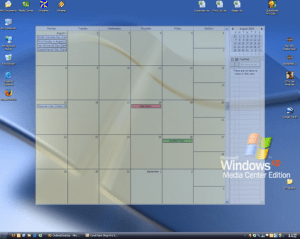
outlook-on-the-desktopHaving fond memories of the desk blotter calendar is a sure way to date oneself technologically. However old-fashion and primitive they were, those big month-at-a-glance calendars were a good way to keep one’s daily life in plain sight. Now the freeware application “Outlook on the Desktop” brings that functionality to your computer’s desktop by embedding the Outlook calendar directly into your desktop as a semi-transparent layer. The big plus is that because OOTD uses Outlook, you have access to all of Outlook’s functionality – this means you can pin task lists and even email to your desktop as well. The only drawback is that this application is for Windows only.